
How to update your communication preferences:
- Log into your customer portal at Kin.com
- Click Profile in the left sidebar
- Click on Update Communication Preferences
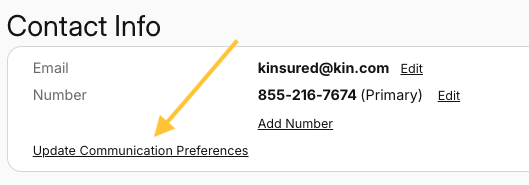
- Review your current settings
- Toggle notifications on or off or unsubscribe from all marketing communications
- Click Save Preferences
- Your changes will take effect immediately. If you have multiple policies, preferences will apply across all policies.
Note: Regardless of your settings, you'll always receive essential communication from us about your insurance policy, documentation, or claims.
If you receive an email about an update that you did not request, please contact Kin customer service immediately at 855-216-7674.
Need to change something else? If you need to change other information or something on your policy, please contact us through our online chat (available at Kin.com and in your portal) or call our support line at 855-216-7674.
Our support teams are here to help and are available during these hours:
- Monday to Friday: 7am - 7pm CT
- Saturday: 8am - 4pm CT
- Sunday: Closed